01
Multi-platform sources
Download WWE 2K25 movesets from PC, Xbox/PlayStation, or Nintendo Switch and bring them into WWE 2K26.
 VYNX
VYNXVynx.dev / Windows Tool
Download 2K25 movesets directly in WWE 2K26.
No file exporting or importing needed.
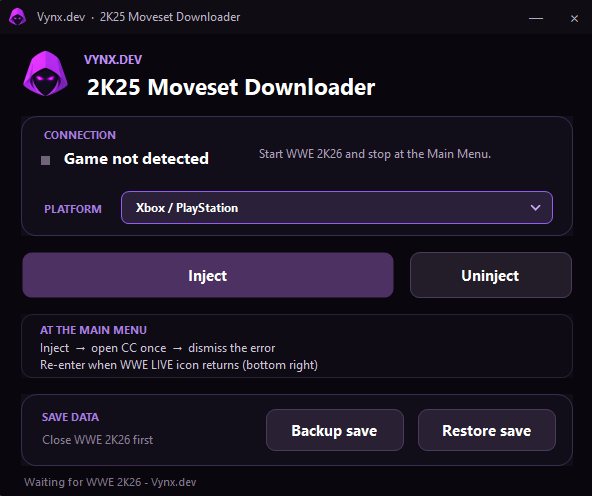
Tool GUI
2K25 → 2K26 // VYNX.DEV
Compact by design
Download WWE 2K25 movesets from PC, Xbox/PlayStation, or Nintendo Switch and bring them into WWE 2K26.
A connection panel keeps WWE 2K26 detection, injection, and uninject controls in one place.
Create a backup before making changes, then restore it from the same compact interface.
Before you begin
Close WWE 2K26 before creating or restoring a backup. Keep a clean copy of your save available before using the injection controls.
Main-menu workflow
Close WWE 2K26 and create a backup before beginning.
Launch WWE 2K26 and wait at the main menu until the game is detected.
Choose PC, Xbox/PlayStation, or Nintendo Switch as the moveset source.
Inject, open Community Creations once, dismiss the error, then re-enter when the WWE LIVE icon returns in the bottom right.